
Have most people ever wondered how do laser printers work to produce those crisp, sharp documents in mere seconds? Our team has spent considerable time exploring the fascinating electrophotographic process that powers these machines, and the technology is remarkably elegant. Whether someone is shopping for a top-rated laser printer or simply curious about the science, understanding the inner workings helps anyone make smarter purchasing and maintenance decisions for home or office printing needs.
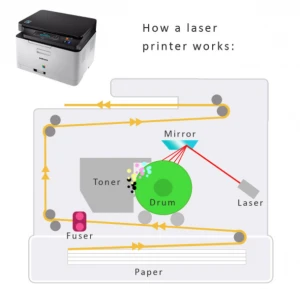
At its core, a laser printer uses static electricity, heat, and a precisely aimed laser beam to fuse powdered toner onto paper. Unlike inkjet printers that spray liquid ink, laser printers rely on a completely dry process that delivers faster speeds and more durable output. Our experience shows this technology remains the gold standard for high-volume text printing across homes, offices, and commercial environments alike.
In this guide, our team breaks down every stage of the laser printing process, examines the key components, compares costs, and shares practical maintenance strategies that keep these machines running at peak performance for extended periods of time.
Contents
Laser printing is built on the principle of electrophotography, a process originally developed by Chester Carlson in the late 1930s and later commercialized by Xerox. The fundamental concept involves using light to alter electrical charges on a photosensitive surface, which then attracts toner particles in precise patterns. According to the Wikipedia entry on laser printing, this technology has evolved dramatically since the first commercial laser printers appeared in the mid-1970s. Our team finds it remarkable that the underlying physics have remained essentially unchanged despite decades of refinement and miniaturization.
Every page that exits a laser printer passes through a precise six-step cycle, and understanding each phase reveals why these machines produce such consistent results.
Pro Tip: The fusing stage is why laser-printed documents feel warm when they first come out — that heat is what bonds toner permanently to the paper fibers.

The drum is the heart of any laser printer, and its photosensitive coating (typically organic photoconductor or OPC) makes the entire process possible. When light hits this coating, it becomes conductive and loses its charge in that precise spot. Most drums last between 10,000 and 50,000 pages before needing replacement, though environmental factors like humidity and dust can shorten that lifespan noticeably. Our team has seen improperly stored drums degrade in months, which is why keeping spare cartridges sealed until installation matters greatly.
Toner is a fine polymer powder mixed with pigment and charge-control agents rather than a liquid ink, which is the fundamental difference from inkjet technology. Key toner components include:
Anyone comparing options should review our guide to the best printer toner models, which covers compatibility and yield differences across major brands and third-party alternatives.
Laser printers dominate the business world for compelling reasons that our team encounters in virtually every office assessment we conduct. High-volume environments benefit most because laser technology handles thousands of pages monthly without the clogging or drying issues that plague inkjet models sitting idle. Law firms, accounting offices, and medical practices rely on laser output for its archival-quality durability and razor-sharp text reproduction at any volume level.
Home users who primarily print text documents, reports, and assignments find laser printers far more economical over time than their inkjet counterparts. Students in particular benefit because toner cartridges do not dry out between infrequent printing sessions, unlike inkjet cartridges that can clog after weeks of inactivity. Our roundup of the best printers for college students highlights several affordable monochrome laser models perfectly suited for academic workloads.
Important: Laser printers are not ideal for photo printing — anyone needing high-quality photo output should consider a dye sublimation printer instead.
Our team always recommends weighing both sides before committing to any printer technology, and laser printing carries distinct strengths alongside some notable limitations.
Advantages:
Drawbacks:
Understanding the true cost of laser printing requires looking beyond the sticker price and calculating the total cost of ownership over the printer's lifespan. The following table compares typical costs across printer categories that our team has benchmarked extensively.
| Cost Factor | Monochrome Laser | Color Laser | Inkjet |
|---|---|---|---|
| Printer Price (Entry) | $100–$200 | $250–$500 | $50–$150 |
| Cost Per Page (B&W) | $0.01–$0.03 | $0.02–$0.04 | $0.05–$0.10 |
| Cost Per Page (Color) | N/A | $0.08–$0.15 | $0.15–$0.25 |
| Toner/Ink Yield | 2,000–10,000 pages | 1,500–5,000 pages | 200–500 pages |
| Drum Replacement | Every 10K–50K pages | Every 10K–30K pages | N/A |
| Monthly Duty Cycle | 5,000–20,000 pages | 2,000–15,000 pages | 500–3,000 pages |
The numbers reveal that anyone printing more than 200 pages per month will recoup the higher upfront laser cost within the first few months through dramatically lower per-page expenses. Our team consistently recommends laser technology for anyone printing beyond casual, occasional use, and the best printers for home offices reflect that philosophy across every price range.
Our team encounters the same preventable errors repeatedly, and avoiding these pitfalls saves both money and frustration over a printer's lifetime.
Warning: Never touch the green photosensitive drum surface with bare fingers — skin oils permanently damage the coating and cause visible streaks on every subsequent print.
A well-maintained laser printer can deliver reliable service for a decade or more, and our team has developed a straightforward maintenance routine that maximizes this longevity without requiring technical expertise.
The consumable supply market offers OEM (original equipment manufacturer), compatible, and remanufactured cartridges at vastly different price points. OEM cartridges guarantee compatibility and print quality but carry premium pricing, while compatible third-party cartridges typically cost 40–60% less with acceptable quality for most standard printing tasks. Our team generally recommends OEM for color-critical work and reputable third-party options for everyday monochrome output. Those interested in the broader printer landscape may also want to explore how 3D printers work, as additive manufacturing shares some fascinating parallels with traditional printing technology in terms of layered material deposition.
Laser printers use a laser beam, static electricity, and powdered toner fused by heat, while inkjet printers spray microscopic liquid ink droplets directly onto paper. This fundamental difference gives laser printers superior speed, lower per-page cost for text, and smudge-resistant output that does not require drying time after printing.
Color laser printers can produce acceptable photos for reports and presentations, but they cannot match the color accuracy and detail of dedicated photo inkjet or dye sublimation printers. Our team recommends laser for text-dominant work and a separate solution for high-quality photo output.
Standard toner cartridges yield between 2,000 and 5,000 pages, while high-yield variants can reach 10,000 pages or more. Actual yield depends on print coverage — the industry-standard 5% page coverage rating assumes mostly text with minimal graphics.
Modern laser printers are safe when used in reasonably ventilated spaces, as they emit minimal amounts of ultrafine particles and volatile organic compounds during operation. Placing the printer in a well-ventilated room and avoiding direct proximity during extended print runs is more than sufficient for home environments.
The fuser assembly must reach approximately 200°C before it can properly melt toner onto paper, and this heating cycle typically takes 10–30 seconds on modern models. Older or larger commercial machines may take longer, but instant-on fuser technology in newer printers has reduced warm-up times significantly.
Color laser printers cost substantially more to purchase and operate, with color toner sets running $150–$400 for a full replacement. Our team recommends color laser only for offices that regularly print marketing materials or color reports — most home users and students are better served by a monochrome multifunction laser paired with occasional professional color printing services.


About Malcolm Woods
Malcolm Woods is a technology writer and sustainability advocate with a background in consumer electronics and a long-standing interest in the intersection of technology and environmental impact. He has spent years evaluating tech products — from smartphones and smart home devices to solar-powered accessories — with a focus on real-world performance, longevity, and value. At the site, he covers tech accessory reviews, smart home gear, buying guides, and practical how-to content for everyday technology users.
Go for the FREE Gifts. Or check out for free energy books from our best collection.
Remove Ad block to reveal all the secrets. Once done, hit a button below